Local SEO for a dental practice is the work that gets it into Google’s map pack and local results for searches such as “dentist near me” or “dental implants Chelsea”. Google says local results are “mainly based on relevance, distance, and popularity” (Google Business Profile Help). A practice controls the first, earns the third through reviews and links, and can’t move the second.
Most of the work happens on the Google Business Profile, and most of what goes wrong there breaks a rule: Google’s own profile and review policies, UK consumer law on reviews, or the GDC’s rules on titles and confidentiality. This guide takes the profile, reviews, replies, listings and tracking in that order; the dental SEO guide covers the rest of search, from treatment pages to AI Overviews. A disclosure first: Cogrank sells local SEO as part of its dental SEO services for UK private practices.
Written by Bogdan Matanie, founder of Cogrank, a Google Ads and SEO consultancy for UK private dental practices. Last updated October 2026.
Why doesn’t my practice show in the map pack for “dentist near me”?
Usually a competitor beats it on relevance or popularity for that searcher’s location. Google’s three factors, and how much of each a practice controls:
| Factor | Google’s definition | What the practice controls |
|---|---|---|
| Relevance | “Relevance is how well a Business Profile matches what someone is searching for.” | Categories, services, description, website content |
| Distance | “Distance refers to how far each business is from the customer who’s searching.” | Nothing, beyond where the practice is |
| Popularity, which the same page also calls prominence | “Prominence means how well-known a business is.” | Reviews, links from other websites, local mentions |
The same page says prominence is “based on info like how many websites link to your business and how many reviews you have.” Distance explains why a practice can top the map pack for someone on its own street and be missing for someone two miles away. A single rank check from one spot tells you little. Local rank trackers that check a grid of points around the practice give the real picture.
How should a private practice set up its Google Business Profile?
Use the practice’s real name, “Dentist” as the primary category, a full list of treatments as services, a local phone number and a tagged website link. Asked for the most common mistake on UK practices’ profiles, Bogdan Matanie didn’t hesitate:
“Without question, it’s keyword-stuffing the business name. I see things like ‘Smile Studio - Dental Implants & Invisalign in Chelsea’ almost daily. It might have worked five years ago, but now it’s a clear violation and it just looks spammy to patients.”
Google’s guidelines for representing your business say the name “should reflect your business’s real-world name, as used consistently on your storefront, website, stationery, and as known to customers”, and that “Including unnecessary information in your business name isn’t permitted, and could result in the suspension of your Business Profile.”
| Field | Do | Avoid |
|---|---|---|
| Business name | The name on the door and the website | Treatments or towns added to the name |
| Primary category | Dentist | “Dental clinic” as the primary; “Orthodontist” without a specialist (see below) |
| Other categories | As few as describe the practice | One category per treatment |
| Services | Each treatment you want enquiries for, with a short description | A single “general dentistry” entry |
| Phone | A local number that rings at the practice | A central call-centre or premium-rate number |
| Website link | The homepage or a location page, tagged with UTM parameters | An untagged link (see tracking below) |
On categories, Google asks owners to “Use as few categories as possible to describe your overall core business from the provided list” and to “Choose categories that are as specific as possible, but representative of your main business.” Bogdan sees “Dental clinic” chosen as the primary category constantly, and in his view it “weakens you for high-intent searches” compared with “Dentist”.
The category is also where the GDC comes in. Its guidance on advertising says: “If you are a dentist and you are not on a GDC specialist list, you must not use titles which may imply specialist status such as Orthodontist, Periodontist, Endodontist etc.” Cogrank’s reading is that patients take a profile labelled “Orthodontist” the same way they take a title, so use it as the primary category only when a dentist on the GDC’s orthodontics specialist list works at that location. The same guidance requires any website naming a dental professional who provides care to display “your GDC registration number”, which applies to the team page the profile sends patients to.
To have your own profile checked against this list, request Cogrank’s free audit: local visibility is one of the three areas it covers.
Should each dentist have their own profile?
Google allows it. Its guidelines say “Doctors, dentists, lawyers, financial planners, and insurance or real estate agents are all individual practitioners”, and that “A practitioner shouldn’t have multiple Business Profiles to cover all of their specializations.” Bogdan would keep it to the principal:
“For a principal or owner who has a genuine personal following, yes, a separate practitioner profile can make sense. For associates, I would usually advise against it. The profile and all of its reviews stay at the practice location when they leave, so you end up with a messy handover, and in the meantime you are splitting your review equity across several weaker listings instead of building one dominant practice profile.”
How do you get more Google reviews without breaking the rules?
Send every patient the same request at the same point, usually an SMS with the practice’s Google review link after the appointment, and never filter who gets it. Google’s tips to get more reviews suggest exactly that: “To leave reviews, you can ask customers to visit a Google link or scan a QR code.”
The trouble is in what practices add on top. Google’s prohibited and restricted content policy bars merchants from trying to “Discourage or prohibit negative reviews, or selectively solicit positive reviews from customers”. Its list of banned practices also includes “Merchants requesting that staff solicit a certain number of reviews” and requests for reviews that include “content that identifies a staff member.” That rules out two habits common in practices: monthly review targets for reception or nurses, and asking patients to mention their dentist by name.
UK law adds its own layer. The Digital Markets, Competition and Consumers Act 2024 bans submitting or commissioning “a consumer review that conceals the fact it has been incentivised” (Schedule 20, paragraph 13), and the CMA’s fake reviews guidance explains how businesses should comply. The ASA’s advice on fake consumer reviews says publishing reviews in a misleading way includes “Failing to publish, or removing from publication, negative consumer reviews whilst publishing positive ones”. That covers a reviews widget on the practice website set to show five-star reviews only.
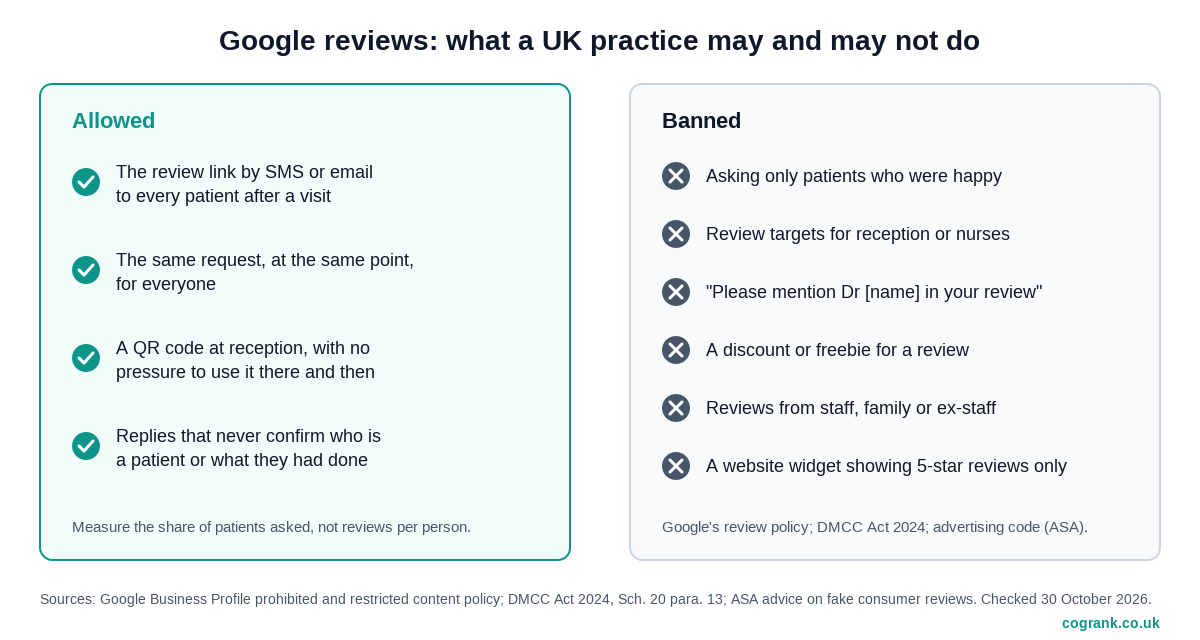
| What the practice does | Verdict | Rule |
|---|---|---|
| Sends the review link by SMS or email to every patient after an appointment | Allowed | Google suggests a review link or QR code |
| Puts a QR code at reception, with no pressure to use it | Allowed | Google bars requiring or pressuring reviews “while on the premises” |
| Sends the link only to patients who said they were happy | Banned | Google: no selective solicitation |
| Sets monthly review targets for staff | Banned | Google: no requests that staff solicit a certain number |
| Asks “please mention Dr [name] in your review” | Banned | Google: no requests for content naming a staff member |
| Offers a discount or a free whitening top-up for a review | Banned | Google bans any incentive; UK law bans concealed incentivised reviews |
| Lets staff, family or former employees review the practice | Banned | Google: a conflict of interest includes “current or former employment” |
| Shows only five-star reviews on the website | Banned | Advertising code, as explained by the ASA |
Bogdan’s alternative to staff targets:
“Ask every patient in exactly the same way at the same point in the journey, for example an automated SMS shortly after their appointment. Then measure the percentage of patients who were actually asked, not how many reviews each receptionist or nurse brought in. You manage the system, not the outcome.”
How should you reply to a negative review?
Briefly, without confirming that the reviewer is a patient, and with an offer to talk it through offline. A reply that mentions an appointment, a treatment or a fee discloses patient information. The GDC’s Standard 4.2.1 says “You must keep patient information confidential”, and that “This applies to all the information about patients that you have learnt in your professional role including personal details, medical history, what treatment they are having and how much it costs.”
An example of a reply that stays within that (an illustration, not wording from the GDC):
“Thank you for taking the time to leave feedback. We take every comment seriously and would like to understand what happened. Please contact our practice manager on [practice number] or [email] so we can talk it through.”
Google still wants an answer: “As best practice, reply to reviews and share your perspective.” The reply is read by every patient who looks at the profile afterwards, so write it for them. Thank positive reviewers too, again without naming their treatment.
Which directories matter for UK practices?
Fewer than citation-building packages suggest. The listings that matter most are Google, Apple Business Connect for Apple Maps, Bing Places and, for practices with an NHS contract, the NHS website’s Find a dentist service. Beyond those, a handful of UK and healthcare directories is enough.
What matters more than the count is that the practice’s name, address and phone number (NAP) read exactly the same on every listing. That is also the reason for Bogdan’s rule on call tracking in the next section.
How do you know which calls and bookings came from Google Maps?
Tag the website link, read the profile’s Performance report, link the profile to Google Analytics and, if you track calls, keep the real number on the profile too. Many practices do none of these. In Cogrank’s October 2026 sample of 40 Manchester listings for “private dentist”, 14 (35%) used tracking parameters on their profile’s website link: 9 of 35 independent practices and all 5 corporate-group listings. That is one city, so read it as a pointer, not a national figure.
“Always UTM tag the website link, that is non-negotiable.” (Bogdan Matanie)
| Method | What it shows | What it misses |
|---|---|---|
A UTM-tagged website link, for example ?utm_source=google&utm_medium=organic&utm_campaign=gbp |
Website visits and online enquiries that started on the profile | Phone calls, and visitors your cookie banner keeps out of analytics |
| The profile’s Performance report | Calls, website clicks, direction requests and bookings | Whether a call was answered or booked; it also counts Google Ads activity |
| Google Analytics linked to the profile | The profile’s figures next to website data | Anything older than 6 months, and any split between linked profiles |
| A tracking number as primary, the real number as additional | Calls you can match to bookings | Nothing, as long as the real number stays on the profile |
The parameters are Google’s: its URL builder help lists utm_source, utm_medium and utm_campaign among them. Google’s Performance help page counts calls as “The number of times a customer clicked on the call button on your Business Profile”, a click rather than a conversation, and says “Performance data includes views, searches, and actions from both organic search results and Google Ads.” Bookings appear only with a connected booking system: “To get data for this metric, your bookings must be managed through a booking provider.” The newer Analytics link brings those metrics into Google Analytics, but “Google Business Profile metrics are available for the last 6 months.”
On the phone number, Bogdan’s method keeps attribution without breaking NAP consistency:
“For the phone number, if you want to use call tracking, put the tracking number as the primary number but make sure you add the real practice number as the secondary number in the profile. That way you get your attribution, but your NAP details still match everywhere else online, which is critical.”
Google’s guidelines allow it: “Additional phone numbers can be used on Google Business Profile websites and other local surfaces.”
The free dental marketing audit checks this part too: whether the profile’s website link is tagged, and how the practice counts the enquiries that come from Maps.
How do local SEO and Google Ads work together?
They share the profile. Google Ads location assets let ads show “information such as the store address, a map to the store location, or the approximate travel distance to help people find your stores”, and Google’s location assets help explains how to link location assets to a Business Profile. Because the profile’s Performance report counts actions from ads as well as organic results, switching ads on also changes the numbers local SEO gets judged by. Judge local SEO on the UTM-tagged organic visits, not on the profile’s call total.
Cogrank’s split for a single-site private practice: local SEO for the searches where the map pack appears (the practice’s own area, “near me”, general dentistry), and paid search for high-value treatments and for towns too far away for the profile to show. The Google Ads guide for private dental clinics covers which treatments to bid on first, and how to get more private dental patients compares the cost and speed of every channel.
Next step
Most of the fixes above need no agency: rename a stuffed profile, change the primary category, tag the website link, link Analytics, and replace staff review targets with one request to every patient. If you’d like a second pair of eyes first, request Cogrank’s free dental marketing audit. It covers local visibility, website conversion and Google Ads where applicable. You receive a written summary of three to five priorities. We confirm scope and timing after your enquiry; a discussion is optional. What local SEO costs when you buy it, with sourced UK price ranges, is in the dental SEO pricing guide. Calls offering to “verify” or “protect” your Google listing for a fee are covered in the SEO spam guide.